

As WordPress continues to power a sizeable share of the web (well over 40% of all websites), the question every site owner eventually asks is a simple one: “Is my site secure?” For most people, the answer comes from a vulnerability scan. You run a scan, it reports no known issues, and you breathe a sigh of relief.
But a clean vulnerability report only tells you half the story. It confirms that none of your installed software matches a known security flaw today. It says nothing about how much of your site is exposed to attack in the first place. Industry analyses consistently attribute the overwhelming majority of WordPress vulnerabilities (by most counts, around 95%) to plugins and themes rather than the core platform. And here is the uncomfortable part: every plugin you install widens the area an attacker can reach, even when that plugin is perfectly patched and has no known vulnerabilities at all.
Related: Reducing the WordPress Attack Surface
In this article, we will look at what an “attack surface” actually is, why a clean vulnerability scan is necessary but not sufficient, and how WPSec’s Attack Surface Analysis measures the exposure of every plugin on your sites, so you can see exactly where you are exposed and act on it before an attacker does.
Please note: Attack Surface Analysis is a new, experimental feature that we are still testing, and the per-site analysis in your WPSec dashboard is available only to premium (paying) customers. Anyone, though, can look up the attack surface of any individual plugin in our public database at attacksurface.wpsec.com, which now covers over 118,000 plugins.
What is an “attack surface”?
Your attack surface is the sum of all the points where an attacker could try to get in. Think of your website as a house. A vulnerability scan checks whether any of your locks are known to be faulty (a useful thing to know). But it does not count how many doors and windows you have in the first place. A house with one front door is far easier to defend than a sprawling property with forty entrances, even if every lock is brand new.
In WordPress terms, each plugin you add brings its own doors and windows. Concretely, those entry points include:
- REST API endpoints: the standard way WordPress exposes functionality to apps, mobile clients, and the browser. Every endpoint a plugin registers is another route into your site.
- Input parameters: every GET, POST, header, or cookie value a plugin reads is a place where malformed or malicious input can be sent.
- File-upload handlers: code that accepts uploaded files. Mishandled, an upload can become the single most dangerous door of all, because it can lead to an attacker running their own code on your server.
- WordPress hooks: the AJAX handlers and action hooks a plugin wires into. These are WordPress-specific input mechanisms, and each one is another way to reach the plugin’s logic.
None of these are bad in themselves; they are how plugins do useful work. But the more of them you accumulate, the more an attacker has to aim at. A plugin can be fully up to date, with a spotless track record, and still represent a large, complex attack surface simply because of how much it exposes.
Why a clean vulnerability scan isn’t the whole story
It helps to think of security risk in two separate dimensions.
The first dimension is what is known to be broken right now. This is what a traditional vulnerability scan measures: it compares the versions of your plugins, themes, and WordPress core against a database of known vulnerabilities and tells you where you match. This dimension is temporal: it changes as new vulnerabilities are discovered and as you apply patches. It is essential, and you should absolutely keep doing it.
The second dimension is how exposed you are by design. This does not depend on whether a vulnerability has been published yet. It depends on the structure of the code you are running: how many endpoints it exposes, how much input it accepts, whether it handles file uploads, how complex it is. This dimension is intrinsic to the plugin, and it barely moves when a patch lands.
These two dimensions are largely independent of one another. A plugin can have zero known vulnerabilities and a very large attack surface. Another can be small and tightly scoped yet currently carry a serious flaw. A vulnerability scan sees the first plugin as perfectly clean. Attack Surface Analysis is how you see the risk the scan cannot.
This matters most when tomorrow’s vulnerability is discovered. When a new flaw is announced in a widely used plugin, the sites that get hurt are the ones already running a large, exposed surface. Knowing where your exposure is concentrated before that day arrives is what turns a frantic emergency into a routine update.
What WPSec’s Attack Surface Analysis measures
WPSec performs automated static analysis of the code behind every plugin installed across your sites, and turns that into a set of plain, comparable numbers. For each plugin, you see:
- Risk level: an overall rating from Critical, High, Medium, Low, down to Minimal, with Unknown for plugins we have no analysis for yet. This is the at-a-glance verdict.
- Risk score: a number from 0 to 100 that summarises the size and complexity of the plugin’s attack surface. The higher the score, the more there is to defend.
- REST endpoints: how many REST API routes the plugin exposes.
- Input parameters: the total number of parameters the plugin reads from incoming requests.
- File-upload entry points: how many places the plugin accepts uploaded files. These are called out separately because they carry outsized risk.
- WordPress hooks: the AJAX and action hooks the plugin registers.
- Security issues: the count of issues the static analysis flagged in the plugin’s code, such as missing input sanitisation or risky patterns.
Alongside the numbers, each plugin carries context that helps you judge it:
- Install count: how widely the plugin is used, drawn from the official directory.
- OWASP category: where the plugin’s main risks sit against the well-known OWASP classification.
- Removed: a clear flag when a plugin has been pulled from the WordPress.org directory, often because of an unresolved security problem. A removed plugin you are still running deserves immediate attention.
- Outdated and Very outdated: whether you are behind on updates, and by how much. A plugin that is fifty or more versions behind is marked as very outdated.
- Commercial: a marker for paid plugins sold outside the official directory, where the public risk score behaves differently and is therefore withheld.
The goal is not to frighten you into deleting half your plugins. It is to replace a vague sense of unease with concrete, comparable figures, so you can make deliberate decisions about what to keep, what to update, and what to remove.
What 118,000 plugins reveal
The same automated analysis that powers your dashboard also runs continuously against the public WordPress plugin directory, and the aggregate picture is worth pausing on. To date, we have analysed over 118,000 plugins and more than 1.8 million individual plugin versions, all of which anyone can browse for free at attacksurface.wpsec.com. A few patterns stand out.
First, exposure is the rule, not the exception. The average analysed plugin scores around 39 out of 100 on our risk scale, and more than a third of the plugin versions we have examined land in the High or Critical exposure tier. Keep in mind that this measures how much a plugin exposes, not whether it carries a known flaw. That is precisely the point: a great deal of exposure sits quietly in plugins that no vulnerability scanner is flagging today.
Second, risky code is common even without a published vulnerability. Across the directory, our automated static analysis has flagged more than 137,000 risky code patterns in close to 19,000 plugins. The most common by a wide margin are database queries assembled from unsanitised input (the classic shape of a SQL injection), followed by AJAX handlers that logged-out visitors can reach with no security token check, and REST API routes registered without a permission check. None of these are “vulnerabilities” in the sense a scanner would report, yet each is the kind of latent weakness that becomes tomorrow’s published flaw.
The lesson is not that plugins are dangerous; they are how WordPress gets useful things done. It is that exposure is widespread, unevenly spread, and almost entirely invisible to a conventional vulnerability scan. The only way to manage what you cannot see is to measure it.
Reading your dashboard
Attack Surface Analysis lives in your WPSec account dashboard as a premium analysis, and it is designed to be read in whatever way suits the question you are asking.
When you open it, you are greeted by a row of risk summary cards (one for each risk level), showing how many plugins across your sites fall into each tier. Clicking a card filters the table to just those plugins, so “show me everything Critical” is a single click.
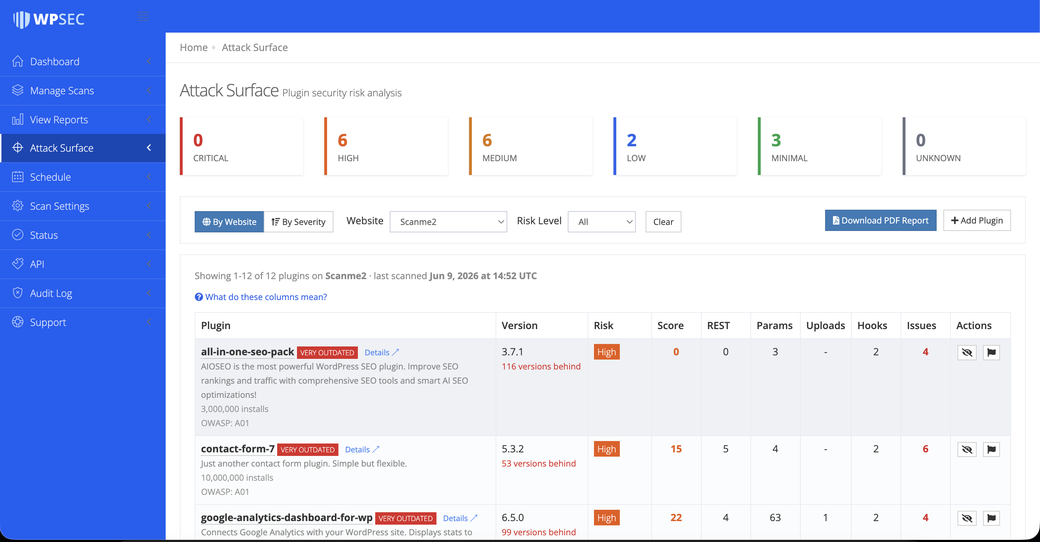
You can then look at your plugins two ways:
- By Website: pick one of your sites and see every plugin installed on it, ranked from most to least risky. This is the view to use when you are hardening a specific site.
- By Severity: see every plugin across all your sites, grouped by risk level, with the sites that use each one listed alongside. This is the view to use when a risky plugin is on the radar and you want to know everywhere it is installed.
A severity filter lets you narrow to a single risk level, and the main table lays out the numbers (risk, score, endpoints, parameters, uploads, hooks, and issues) side by side for easy comparison. Each row also gives you a few practical controls:
- Hide a plugin to mark it as an accepted risk. It moves to the bottom and greys out, so a deliberate decision you have already made stops cluttering your view. You can unhide it at any time.
- Report a plugin if you believe a finding is a false positive, optionally with a note. This feeds back into improving the analysis.
- Manually add a plugin you want tracked even though it was not auto-detected, which is handy for bespoke or internal plugins.
Every view shows the last scanned date so you always know how fresh the picture is, and you can export a PDF of the analysis to share with a client or keep for your records.
Turning the numbers into action
A dashboard full of figures is only useful if it changes what you do next. Here is a straightforward way to work through your attack surface:
- Triage the top of the list first. Start with anything rated Critical or High. These are the plugins contributing most to your exposure, and they are where your attention pays off fastest.
- Deal with Removed plugins immediately. A plugin that has been pulled from the directory will not receive fixes. Find a maintained alternative or remove it.
- Bring Outdated plugins up to date. Updates frequently shrink the attack surface as well as patch known bugs. Anything marked very outdated should be top of the queue.
- Remove what you do not use. Every deactivated-but-installed plugin is still code on your server. If you are not using it, delete it: the cheapest way to reduce your attack surface is to have less of one.
- Vet before you install. Before adding a new plugin, glance at its surface: How many endpoints and parameters does it expose? Does it handle uploads? Is it actively maintained? Choosing a leaner, well-kept plugin over a sprawling, abandoned one is a security decision as much as a functional one.
Worked through patiently, this turns “I have a lot of plugins and I’m not sure which to worry about” into a short, ordered list of specific actions.
The full picture
Attack Surface Analysis is not a replacement for your vulnerability scan; it is the other half of it. Your vulnerability report tells you what is known to be wrong today. Attack Surface Analysis tells you how exposed you are by design, regardless of what has been published. One is temporal, the other structural. Run together, they give you both the known-bug dimension and the exposure dimension, which is as close to a complete view of your WordPress security posture as you can practically get.
A site with no known vulnerabilities and a small, well-chosen set of plugins is genuinely hard to attack. A site with no known vulnerabilities and dozens of sprawling, abandoned plugins is an incident waiting for its trigger. From the outside, a vulnerability scan rates them the same. Attack Surface Analysis is how you tell them apart, and how you turn the second one into the first.
So, is your site secure? A clean vulnerability scan is a good start, but security is about the doors you leave open as much as the locks you happen to know are faulty. Measure your attack surface, and you stop guessing.
If you are a premium customer, open Attack Surface Analysis in your WPSec dashboard to see exactly where your sites stand.
Take control of your WordPress security today. Run a free security scan with WPSec and identify vulnerabilities before attackers do.